
Run Commands To Access The Control Panel:
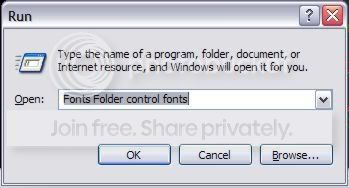
Add/Remove Programs control appwiz.cpl
Date/Time Properties control timedate.cpl
Display Properties control desk.cpl
FindFast control findfast.cpl
Fonts Folder control fonts
Internet Properties control inetcpl.cpl
Keyboard Properties control main.cpl and main.cpl keyboard
Mouse Properties control main.cpl
Multimedia Properties control mmsys.cpl
Network Properties control netcpl.cpl
Password Properties control password.cpl
Sound Properties control mmsys.cpl sounds
System Properties control sysdm.cpl
Run Commands:
compmgmt.msc - Computer management
devmgmt.msc - Device manager
diskmgmt.msc - Disk management
dfrg.msc - Disk defrag
eventvwr.msc - Event viewer
fsmgmt.msc - Shared folders
gpedit.msc - Group policies
lusrmgr.msc - Local users and groups
perfmon.msc - Performance monitor
rsop.msc - Resultant set of policies
secpol.msc - Local security settings
services.msc - Various Services
msconfig - System Configuration Utility
regedit - Registry Editor
msinfo32 - System Information
sysedit - System Edit
win.ini - windows loading information(also system.ini)
winver - Shows current version of windows
mailto: - Opens default email client
command - Opens command prompt
Windows XP, Windows Explorer Shortcuts:
ALT+- (ALT+hyphen) Displays the Multiple Document Interface (MDI) child window's System menu
ALT+ENTER View properties for the selected item
ALT+ESC Cycle through items in the order they were opened
ALT+F4 Close the active item, or quit the active program
ALT+SPACEBAR Display the System menu for the active window
ALT+TAB Switch between open items
ALT+Underlined letter Display the corresponding menu
BACKSPACE View the folder one level up in My Computer or Windows Explorer
CTRL+A Select all
CTRL+B Bold
CTRL+C Copy
CTRL+I Italics
CTRL+O Open an item
CTRL+U Underline
CTRL+V Paste
CTRL+X Cut
CTRL+Z Undo
CTRL+F4 Close the active document
CTRL while dragging Copy selected item
CTRL+SHIFT while dragging Create shortcut to selected item
CTRL+RIGHT ARROW Move the insertion point to the beginning of the next word
CTRL+LEFT ARROW Move the insertion point to the beginning of the previous word
CTRL+DOWN ARROW Move the insertion point to the beginning of the next paragraph
CTRL+UP ARROW Move the insertion point to the beginning of the previous paragraph
SHIFT+DELETE Delete selected item permanently without placing the item in the Recycle Bin
ESC Cancel the current task
F1 Displays Help
F2 Rename selected item
F3 Search for a file or folder
F4 Display the Address bar list in My Computer or Windows Explorer
F5 Refresh the active window
F6 Cycle through screen elements in a window or on the desktop
F10 Activate the menu bar in the active program
SHIFT+F10 Display the shortcut menu for the selected item
CTRL+ESC Display the Start menu
SHIFT+CTRL+ESC Launches Task Manager
SHIFT when you insert a CD Prevent the CD from automatically playing
WIN (Windows Key) Display or hide the Start menu
WIN+BREAK Display the System Properties dialog box
WIN+D Minimizes all Windows and shows the Desktop
WIN+E Open Windows Explorer
WIN+F Search for a file or folder
WIN+F+CTRL Search for computers
WIN+L Locks the desktop
WIN+M Minimize or restore all windows
WIN+R Open the Run dialog box
WIN+TAB Switch between open items
Microsoft Office Keyboard Shortcut Keys

All Caps - CTRL+SHIFT+A
Annotation - ALT+CTRL+M
Auto Format - ALT+CTRL+K
Auto Text - F3 or ALT+CTRL+V
Bold - CTRL+B or CTRL+SHIFT+B
Bookmark - CTRL+SHIFT+F5
Copy - CTRL+C or CTRL+INSERT
Copy Format - CTRL+SHIFT+C
Copy Text - SHIFT+F2
Create Auto Text - ALT+F3
Date Field - ALT+SHIFT+D
Delete Back Word - CTRL+BACKSPACE
Delete Word - CTRL+DELETE
Dictionary - ALT+SHIFT+F7
Do Field Click - ALT+SHIFT+F9
Doc Maximize - CTRL+F10
Doc Move - CTRL+F7
Doc Restore - CTRL+F5
Doc Size - CTRL+F8
Grow Font - CTRL+SHIFT+. (Dot)
Grow Font One Point - CTRL+]Hanging Indent - CTRL+T
Header Footer Link - ALT+SHIFT+R
Help - F1
Hidden - CTRL+SHIFT+H
Hyperlink - CTRL+K
Indent - CTRL+M
Italic - CTRL+I or CTRL+SHIFT+I
Justify Para - CTRL+J
Left Para - CTRL+L
Line Up Extend - SHIFT+UP
List Num Field - ALT+CTRL+L
Outline - ALT+CTRL+O
Outline Collapse - ALT+SHIFT+- or ALT+SHIFT+NUM -
Outline Demote - ALT+SHIFT+RIGHT
Outline Expand - ALT+SHIFT+=
Outline Expand - ALT+SHIFT+NUM +
Outline Move Down - ALT+SHIFT+DOWN
Outline Move Up - ALT+SHIFT+UP
Outline Promote - ALT+SHIFT+LEFT
Outline Show First Line - ALT+SHIFT+L
Lock Fields - CTRL+3 or CTRL+F11
Web Go Back - ALT+LEFT
Web Go Forward - ALT+RIGHT
Word Left - CTRL+LEFT
Word Left Extend - CTRL+SHIFT+LEFT
Word Right - CTRL+RIGHT
Excel Time saving Shortcuts:
Move to next cell in row - TabMove to previous cell in row - Shift + Tab
Up one screen - Page Up
Down one screen - Page Down
Move to next worksheet - Ctrl + Page Down
Move to previous worksheet - Ctrl + Page Up
Go to first cell in data region - Ctrl + Home
Go to last cell in data region - Ctrl + End
Bold toggle for selection - Ctrl + B
Italic toggle for selection - Ctrl + I
Underline toggle for selection - Ctrl + U
Strikethrough for selection - Ctrl + 5
Change the font - Ctrl + Shift + F
Change the font size - Ctrl + Shift + P
Apply outline borders - Ctrl + Shift + 7
Remove all borders - Ctrl + Shift + Underline
Wrap text in same cell - Alt + Enter
Format cells - Ctrl + 1
Select font - Ctrl + Shift + F
Select point size - Ctrl + Shift + P
Format as currency - Ctrl + Shift + 4
Format as general - Ctrl + Shift + # (hash sign)
Format as percentage - Ctrl + Shift + 5
Format as number - Ctrl + Shift + 1
Autosum a range of cells - Alt + Equals Sign
Insert the date - Ctrl + ; (semi-colon)
Insert the time - Ctrl + Shift + ; (semi-colon)
Insert columns/rows - Ctrl + Shift + + (plus sign)
Insert a new worksheet - Shift + F11
Read Monitor Cell One - Alt + Shift + 1
Read Monitor Cell Two - Alt + Shift + 2
Read Monitor Cell Three - Alt + Shift + 3
Read Monitor Cell Four - Alt + Shift + 4
List Visible Cells With Data - Ctrl + Shift + D
Lists Data In Current Column - Ctrl + Shift + C
List Data In Current Row - Ctrl + Shift + R
Select Hyperlink - Ctrl + Shift + H
Move To Worksheet List box - Ctrl + Shift + S
Move To Monitor Cell - Ctrl + Shift + M
Select Worksheet Objects - Ctrl + Shift + O
List Cells At Page Breaks - Ctrl + Shift + B
Options Listbox - Insert + V
Easy move through Powerpoint
Apply subscript formatting - CTRL+EQUAL SIGN (=)
Apply superscript formatting - CTRL+PLUS SIGN (+)
Bold - CTRL+B
Capitalize - SHIFT+F3
Copy - CTRL+C
Delete a word - CTRL+BACKSPACE
Demote a paragraph - ALT+SHIFT+RIGHT ARROW
Find - CTRL+F
Insert a hyperlink - CTRL+K
Insert a new slide - CTRL+M
Italicize - CTRL+I
Make a duplicate of the current slide - CTRL+D
Open - CTRL+O
Open the Font dialog box - CTRL+T
Paste - CTRL+V
Print - CTRL+P
Promote a paragraph - ALT+SHIFT+LEFT ARROW
Repeat your last action - F4 or CTRL+Y
Save - CTRL+S
Select all - CTRL+A
Start a slide show - F5
Switch to the next pane (clockwise) - F6
Switch to the previous pane - SHIFT+F6
Undo - CTRL+Z
View guides - CTRL+G
No comments:
Post a Comment